

This small tool comes as a great help to import the shots from your digital photo-camera into your computer.
With this software you will be able to take photos from any media device (flash memory cards etc..), rename the files and organize them in folders on your PC.
The job of Smart Import is taking photos from your camera or any other media device (flash, memory cards etc..), and copying/moving them to your PC while the files are automatically renamed and organized in folders by subject and by date.
Smart Import loads very quickly and doesn't make your computer look like a dinosaur.
Getting photos with Smart Import couldn't be easier.
more info @http://www.nwspro.com/si.htm
:: Not Just Another Resource Blog ::

All images and trademarks are the copyright of their respective owners, we are not affiliated nor are we related to any of the companies listed on this site unless otherwise mentioned. If there is a mistake on the site and we offend you in some way, please contact me to let us know the problem and we will fix it asap. This blog functions a lot like google does.
People search and find what they need.
----------
We do not endorse any post on this blog nor any link here. We do not upload nor null any software/dvd/script/graphic/template etc. For more info, please refer to the DMCA Policy.
----------
If you see something that was 'yours' when you posted it, and happen to be 'offended' someone might share something of 'yours', yet you felt free to share it and are now selective, and it's been posted here, just email me and I will take care of that, no questions. We are all here to respect each other.
----------
If you wish to copy something from here, for your blog, website, news articles, etc., please, feel free to do so. You can also email me to be added to the Mailing List and you will receive a post for each area you request.
Information is our freedom.

“Now and then we had a hope that if we lived and were good, God would permit us to be pirates”
-Mark Twain
Showing posts with label Appz | Photo. Show all posts
Showing posts with label Appz | Photo. Show all posts
Thursday, December 3, 2009
Smart Photo Import v1.8.1

Wednesday, September 9, 2009
Home Photo Studio v1 DateCode 20090822 ReadNFO-PH
PH has released this interesting and powerful photo editing and manipulating application. With this app you can edit your photos and achieve great results. Enjoy. 
Description: Home Photo Studio is powerful and easy-to-use photo editing software offering a complete set of image manipulation tools. Thanks to a convenient interface and a detailed help system, the software is simple to learn but provides enough options to keep any photo enthusiast creatively occupied. With Home Photo Studio, you can view and edit your digital shots. Photos can be retouched, color can be enhanced, red eye can be removed, and blurred images can be made clearer. All of these changes can be made with a click of the mouse! more…

Features:
- Support 20 input and output graphic formats.
- Fast and easy-to-use Image Explorer.
- Enhancement of low-quality digital photos.
- Support adjustment of Levels, Curves, Color Balance, Contrast, Saturation, etc.
- Wide range of available effects for creation of unique art photographs.
- More than 100 photo frames and mask effects.
- All-around technical and sale support.
Size: 51.02MB
Links: NFO, Homepage
Download: Hotfile
Tuesday, June 9, 2009
Serif PhotoPlus X3 v13.0

PhotoPlus X3 Digital Studio – The professional digital image editing solution.
Whether you’re quickly resizing holiday snaps, removing flaws from portraits, adjusting exposure and color levels, restoring old images, importing Photoshop® documents, layering and masking professional artwork, or transforming photos with unique effects and artistic styles, PhotoPlus X3 Digital Studio has everything you need to achieve the highest quality results – fast.

Key PhotoPlus X3 Digital Studio benefits include:
- QuickFix, Makeover, Raw Image, and Print Studios for fast results
- High Dynamic Range (HDR) Imaging for stunning effects
- Restore and repair tools for bringing old or damaged photos back to life
- Turn photos into art emulating water color, Impressionist, Van Gogh, and more
- Compatibility with many image formats including Adobe® Photoshop®
- Professional support for high color (48-bit) images, layers, and smart filters
more info @http://www.serif.com/photoplus/
| Part 1 of 5 | Part 2 of 5 | Part 3 of 5 | Part 4 of 5 | Part 5 of 5 |
DepositFiles
| Part 1 of 5 | Part 2 of 5 | Part 3 of 5 | Part 4 of 5 | Part 5 of 5 |
OLYMPUS Studio v2.22-NoPE

Description: Olympus has a major update of its Olympus Studio RAW conversion and camera-control software for photographers using its E-System DSLRs. Version 2.0 features a new user interface and is finally compatible with Intel Macs and Windows Vista as well as supporting the latest E-410 and E-510 cameras. Olympus has also added CD sleeve design and printing functionality along with a file backup system to make Studio close to a ‘one stop shop’ workflow solution. Olympus Studio 2.0 is available now as a 30 day trial from the Olympus site - link after the jump

Features:
PC-control of the camera
If the camera is connected to the PC, it can be controlled from the computer and the recorded images are stored directly onto the hard drive.
Image editing
E.g. for tone curve or colour corrections.
Batch processing
This can carry out a list of editing procedures on a whole group of images at the same time. For example, distortion can be corrected or a colour filter applied on more than one file at a time. The general image enhancement of all shots from a shooting session can be carried out quickly.
Rapid processing of RAW files
If selected, high-speed RAW development function allows the extremely fast saving of RAW files as TIFF or JPEG files.
Automatic tone adjustment
Automatic adjustment of tone curves in individual image sections so that tone gradation appears natural even in parts darkened by backlighting or shadowed by excessive front lighting.
Size: 56.29 MB
Links: NFO, Homepage
Download: Hotfile
Wednesday, June 3, 2009
Focus Photoeditor v6.0.4 Regged-F4CG

Photoeditor is an image and photo editor, picture retouching tool, web albut creator, image browser and Photoshop Filters Host Application for Windows. Enjoy this release by F4CG.
Description:
Focus Photoeditor is a powerful image editor and photo enhancer software for Windows. Besides its excellent abilities to correct digital photos, it has many rich tools and effects found just in much more expensive tools.
And there are also many tools you can hardly find elsewhere. People who care about their photos choose to have Focus Photoeditor because it makes easy to achieve professional photo correction in few steps. Focus Photoeditor infact combines amount and quality of features with the user-friendly interface. Version 5 is now a lot FASTER, has improved algorithms, new features and a completely renewed skin.
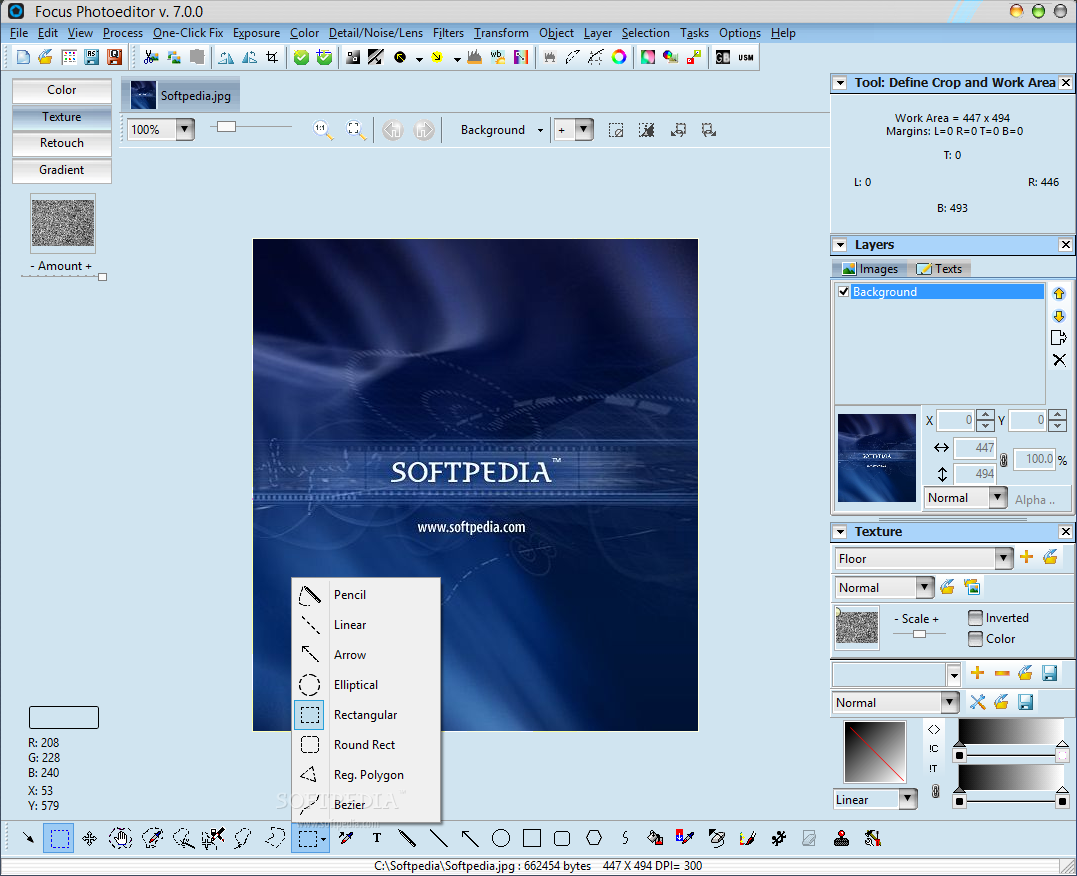
Focus Photoeditor:
- Loads fast, letting you immediately start to edit your pictures.
- Program does not eat up memory, it just uses the right amount necessary for working: memory consumption does not grow with number of layers or the number of pictures opened in the editor.
- Supports over 70 digital camera RAW formats. (Click here for the list)
- Has a very comprehensive and professional set of features.
- Has the best set of Automatic Photo Corrections available on the market.
- High quality photo correction algorithms, which are also finely tuned. An example is the new Unsharp Mask filter.
- Has a very easy to use Batch Processor with undo capabilities.
- Supports powerful ways of creating Selections and has separate undo history for them.
- Features great control over precise editing (exact positioning of layers, precise cropping, printing in exact size and position etc..)
- Many options to save and export files (optimized size and preview for all formats)
- Very comfortable picture browser: lets you rotate, make backup copies, copy&paste, print picture files in a sheet.
Release name: Focus.Photoeditor.v6.0.4.Regged-F4CG
Size: 11.3MB f4143901.zip
Links: Homepage - NFO
Download: Hotfile
PhotoLine v15.06 Incl Keymaker-CORE

Description:
A very powerful image processing application, offers flexible text, vector and image layers. PhotoLine 32 is a software that allows you process images. Among the standard features like painting, cloning, filtering, blending and flood fill it offers many special effects like squirl, shadow, glowing, distorb, morphing, 3d projection and many dynamic layer effects.
Some features:
- powerful image editing software
- layout, vector editing, batch convert and web editing software
- many import and export file formats
- action (macro) recorder
- full CMYK support
Size: 17.3 mb
Links: Homepage, Nfo
Download: Here
Tuesday, June 2, 2009
Amor Screen Capture v2.4.8.1

Amor Screen Capture is a tool for capturing any part of your screen. You can make professional screen shots and save them as bmp, png, pcx, tif, gif or jpg files.
Amor Screen Capture can capture the entire screen, a window, program menus, scrolling windows, DirectX sources, DOS screens, digital camera images, and any on-screen activity. With this useful software, you can make screenshots, edit picture, print image and copy the snapshot of screen to clipboard. Amor Screen Capture is the must-have, all-in-one screen capture utility. Amor screen capture will help improve your message by visually communicating your thoughts and ideas. Amor Screen Capture's easy-to-use capture options will quickly increase your productivity by allowing you to spend more time creating and less time explaining!
Key features:
more info @http://www.zealot-soft.com/screen_capture.htm
| Rapidshare | DepositFiles |
CamPaper v1.46 (Webcam to Wallpaper)

Webcam to Wallpaper Auto updates your wallpaper with web camera views from around the world Over 200 sites to view and climbing + your own Picture folders.
Some Locations
CANADA
BC - Vancouver, English Bay, Harbours, Kitsilano, Jerico, Westminster, Beluga Whales in Aquarium
BC - Vancouver Island, Parksville, Victoria OakBay, Cowichan,Saanichton
AB - Vernon, Banff, Calgary
ON - Niagara falls, Mississauga
NS - Halifax University, Peggy's cove, Harbor, many more
USA
NY - New York City
NJ - Newark
FL - Ft. Lauderdale
CA - San Francisco, Sausalito, LA Altadena, Zebra-Camels, Balboa Ferry, Balboa Yacht Club, Huntington Beach
FL - Daytona Beach, Fort Lauderdale
WY - Jackson Hole
Hi - Maui
AK - Homer
MO - Saint Louis
NC - Surf City
more info @http://campaper.com/
| Rapidshare | DepositFiles |
Tuesday, May 26, 2009
AMS Photo Collage Creator v3.25

Photo Collage Creator is advanced digital scrapbooking and photo collage software that turns ordinary digital pictures and text into personalized works of art.
The program combines three amazing functions: dozens of pre-designed fabulous collage templates, more than 50 photo frames, special mask effects, and flexible publishing formats. Photo Collage Creator includes everything one needs to turn regular digital photos and text into great-looking scrapbook pages suitable for printing, adding to a scrapbook, sharing with friends or hanging on the wall.


Photo Collage Creator also introduces an entirely fun idea to assemble your precious photos into an artistic compilation, completely re-expressing your ideas. Using advanced features such as halo effect, perspective and atmosphere correction, you achieve dazzling results. With the innovative and fast digital collage software, the only limit to what you are able to create is your imagination!
Features:
- Stamp out your images into a variety of creative shapes
- A lot of clip art images are included to spice up any project
- Powerful layering technology enables you to add and arrange photos in your collage any way you want
- Use unique Perspective function to create amazing effects
- Beautiful templates
- Insert your own funny slang words, catch phrases or personal sentiments
- Dozens of unique photo effects are included
- Save your creation as any of the standard image formats including jpg, bmp, and tif
- Print your masterpiece using special print dialog
| Rapidshare | DepositFiles |
LaserSoft Imaging SilverFast Ai Studio EPSON Stand Alone v6.6.0r6-TE

This software offers the best settings and quality for scanning pictures, photos or texts. Silverfast have many powerful features. Many professionals use this software, maybe you should give this a try? Enjoy.
Description:
SilverFast Ai award-winning scanner software sets a new standard for ease of control and sophistication for desktop scanners (film and flatbed). SilverFast Ai is high-end scanning and image optimization software from LaserSoft Imaging, a pioneer in desktop high-end imaging. SilverFast Ai is individually adapted to each supported scanner and therefore can get the very best out of each scanner.
SilverFast Ai combines a very intuitive user interface with sophisticated and professional scanner and image controls.Beginners and professionals will appreciate the unique real-time controls and the intelligent automatic functions as well as the ability to manually adjust the image at any point.

Predictable color from the SilverFast Ai preview gives imaging and color reproduction a new dimension securing the correct workflow with the ScanPilot. The professional user can adjust any operation via numerical input and can precisely monitor the results using the integrated densitometer. SilverFast Ai enables any level of user to achieve brilliant results quickly !
Release name: LaserSoft.Imaging.SilverFast.Ai.Studio.EPSON.Stand-Alone.v6.6.0r6-TE
Size: 55MB tsfase2a.zip
Links: Homepage - NFO
Download: Hotfile
Monday, May 25, 2009
Corel Professional Photos Objects V
Corel Professional Photos Objects V | 100 Images, 18MB, 6x10" 300dpi | 484.64 MB
Ottawa's Corel Corporation has been a long-time booster of the CD-ROM format. First, their drivers have provided some of the small mount of sanity that exists for users trying to get presumably compatible SCSI devices (including most CD-ROM players) to coexist on PCs
Then, for several years, they've provided CD-ROM disks as part of their popular Corel Draw illustration software. While the program can be used without access to the shiny silver disk, CD-ROM owners got hundreds of extra fonts, and multi-megs of additional clipart.
Now, spurred on by the increasing number of CD-ROM players, and by Kodak's efforts to standardize its PhotoCD format, Corel has gone one step further, with the release of over 100 titles in its new Professional Photos on CD-ROM series.
Download (hotfile):
http://hotfile.com/dl/3778165/845582d/photoobjV_moivo1.softarchive.net.part1.rar.html
http://hotfile.com/dl/3778168/cab3cbb/photoobjV_moivo1.softarchive.net.part2.rar.html
http://hotfile.com/dl/3778164/6be0038/photoobjV_moivo1.softarchive.net.part3.rar.html
http://hotfile.com/dl/3778166/a9a6656/photoobjV_moivo1.softarchive.net.part4.rar.html
http://hotfile.com/dl/3778167/09de680/photoobjV_moivo1.softarchive.net.part5.rar.html
Download (RapidShare)
http://rapidshare.com/files/237195690/photoobjV_moivo1.softarchive.net.part1.rar
http://rapidshare.com/files/237195451/photoobjV_moivo1.softarchive.net.part2.rar
http://rapidshare.com/files/237194358/photoobjV_moivo1.softarchive.net.part3.rar
http://rapidshare.com/files/237195691/photoobjV_moivo1.softarchive.net.part4.rar
http://rapidshare.com/files/237194417/photoobjV_moivo1.softarchive.net.part5.rar
Corel Professional Photos Objects VII
Corel Professional Photos Objects VII | 100 Images, 18MB, 6x10" 300dpi | 506.19 MB
Ottawa's Corel Corporation has been a long-time booster of the CD-ROM format. First, their drivers have provided some of the small mount of sanity that exists for users trying to get presumably compatible SCSI devices (including most CD-ROM players) to coexist on PCs
Then, for several years, they've provided CD-ROM disks as part of their popular Corel Draw illustration software. While the program can be used without access to the shiny silver disk, CD-ROM owners got hundreds of extra fonts, and multi-megs of additional clipart.
Now, spurred on by the increasing number of CD-ROM players, and by Kodak's efforts to standardize its PhotoCD format, Corel has gone one step further, with the release of over 100 titles in its new Professional Photos on CD-ROM series.
Download (hotfile):
http://hotfile.com/dl/3776211/03bb261/Photos.Objects.VII.part1.rar.html
http://hotfile.com/dl/3776212/8b6630f/Photos.Objects.VII.part2.rar.html
http://hotfile.com/dl/3776208/2b736a7/Photos.Objects.VII.part3.rar.html
http://hotfile.com/dl/3776209/06875e8/Photos.Objects.VII.part4.rar.html
http://hotfile.com/dl/3776210/77cb366/Photos.Objects.VII.part5.rar.html
http://hotfile.com/dl/3776213/c9368de/Photos.Objects.VII.part6.rar.html
Download (RapidShare):
http://rapidshare.com/files/237197431/photoobjVII_moivo1.softarchive.net.part1.rar
http://rapidshare.com/files/237197365/photoobjVII_moivo1.softarchive.net.part2.rar
http://rapidshare.com/files/237197376/photoobjVII_moivo1.softarchive.net.part3.rar
http://rapidshare.com/files/237197537/photoobjVII_moivo1.softarchive.net.part4.rar
http://rapidshare.com/files/237196377/photoobjVII_moivo1.softarchive.net.part5.rar
http://rapidshare.com/files/237196203/photoobjVII_moivo1.softarchive.net.part6.rar
Sony Picture Package Ver. 1.8.1 for DVD Handycam + Nero Express 6
The program allows you to connect the camera to the computer to send and process the video directly from your camera.
The file is a disk image contains:
- USB DVD Drive
- Picture Package
- ImageMixer EasyStepDVD (Pixela Corporation)
- First Step Guide
As well as Nero Express 6
Year: 2009
Developer: Sony Corporation
Language: English
File Size: 489.42 Mb
OR
Download (Hotfile)
A4 Photo Enhancer v1.3

A4 Photo Enhancer is a fast and easy to use real-time image enhancing application.
This cute tool transforms your ordinary, dull, flat looking photos into detailed, rich, glowing, beautiful images. It improves the quality of your photos in a number of ways: adjusting brightness, contrast, gamma, hue, lightness, saturation, red-green-blue, desaturating, intensity, inverting, equalization, threshold, posterize on demand; applying sharpen effect, blur effect, minimal and maximal effect, positional filters effect, noise effect, diffuse effect, embossing effect,
relief effect, texturize effect, mosaic effect, halftones effect; performing autocrop transformation, flip vertical and flip horizontal transformation, rotation transformation, perspective transformation, skew transformation, twirl transformation and more.
The following image formats are supported:
more info @http://www.a4video.com/A4PhotoEnhancer.htm
| Rapidshare | DepositFiles |
Subscribe to:
Posts (Atom)
