:: C0LDCH47 ::

:: Not Just Another Resource Blog ::


All images and trademarks are the copyright of their respective owners, we are not affiliated nor are we related to any of the companies listed on this site unless otherwise mentioned. If there is a mistake on the site and we offend you in some way, please contact me to let us know the problem and we will fix it asap. This blog functions a lot like google does.
People search and find what they need.
----------
We do not endorse any post on this blog nor any link here. We do not upload nor null any software/dvd/script/graphic/template etc. For more info, please refer to the DMCA Policy.
----------
If you see something that was 'yours' when you posted it, and happen to be 'offended' someone might share something of 'yours', yet you felt free to share it and are now selective, and it's been posted here, just email me and I will take care of that, no questions. We are all here to respect each other.
----------
If you wish to copy something from here, for your blog, website, news articles, etc., please, feel free to do so. You can also email me to be added to the Mailing List and you will receive a post for each area you request.

Information is our freedom.
“Now and then we had a hope that if we lived and were good, God would permit us to be pirates”
-Mark Twain

Saturday, May 30, 2009

Belltech.CaptureXT.Screen.Capture.v3.0.2.Incl.Keygen-DJiNN

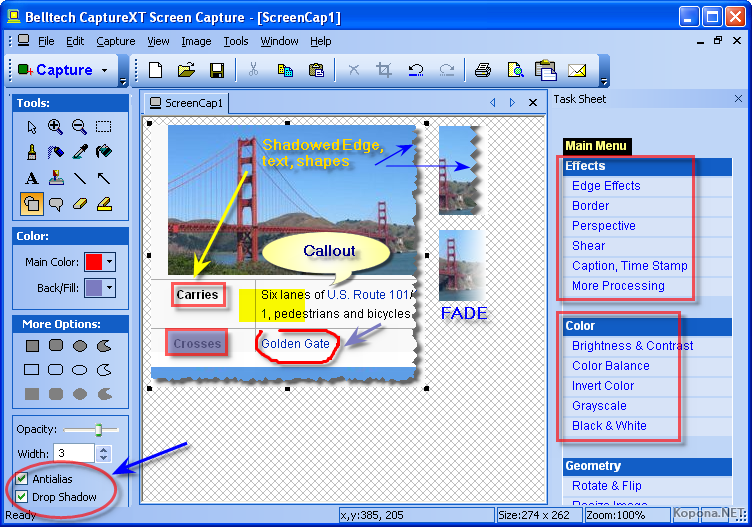
Belltech CaptureXT Screen Capture 3.0.2

Belltech CaptureXT is a professional quality screen capture program for Windows. Capture any part of your computer screen, edit in several ways, apply effects to enhance communication and share easily. Put text, lines, arrows, translucent shapes to illustrate your ideas easily and effectively. Save your work in popular image formats (jpg, gif, bmp, png) or email it or paste to your presentations, manuals, marketing materials, web pages.

Main features:
» Capture full desktop or active window
» Capture rectangular or circular area
» Capture error screens or online receipts
» Copy-paste to your presentation, training handouts
» Annotate capture or apply effects
» Put text, lines, arrows, translucent shapes
» Add stamps, timestamp to your capture
» Apply shadows, torn edges, faded edges
» Save as jpg, gif, png images or email directly
» Change brightness/contrast, rotate/flip and more

Belltech.CaptureXT.Screen.Capture.v3.0.2.Incl.Keygen-DJiNN
Depositfiles.com
Ifolder.ru
Rapidshare.com
Letitbit.net

Homepage

Belltech Scrapbook Design Studio v2.2.1

Belltech Scrapbook Design Studio 2.2.1

Creating scrapbook pages from your digital photos is fun and exciting.

Scrapbook Design Studio has everything you need to make excellent and inspiring scrapbook pages quickly. This programs offers many pre–designed templates that you can use or alter them to suit your style. It also has embedded photo editing tools to fine-tune your photos or apply dazzling effects.

0day.car.net.pk
jnm5zumum8tdvwhdahdx.gif ci5s0i302s5vfhwzub05.jpg

Product Highlights:
  • Ease of Use – This scrapbooking software is designed for novice as well as advanced computer users. It has tools and actions items laid out around your work area so it is easy to find. With extensive toolbar and menu items you can quick design and print your scrapbook.
  • Variety of Templates and Images – We offer a wide variety of pre–made scrapbook page templates and a moderate selection of fonts, frames and clip art to embellish any scrapbook project.
  • Importing Photos – It allows you to import your own digital photos, images from a disc, local hard-drive or digital camera easily and quickly.
  • Editing Photos – Our software is equipped with photo editing capabilities such as color-correction, contrast adjustments, rotate and flip. It also offers photo-effects like torn-edge with shadow, bluring etc.
  • Share Your Work – You can save your scrapbooking project in editable format or images and share the files via email or flash-drive, or print it on your own printer.
more info @http://www.belltechsystems.com/scrapbooking-software/
Download through Rapidshare or DepositFiles
| Rapidshare | DepositFiles |

Belltech Photo Editor Max v2.0

Belltech Photo Editor Max 2.0

Professional image edit application!

Belltech Photo Editor Max is a professional quality image edit program for Windows. Edit images in several ways, apply effects to enhance communication and share easily. Put text, lines, arrows, translucent shapes to illustrate your ideas easily and effectively. Save your work in popular image formats (jpg, gif, bmp, png) or email it or paste to your presentations, manuals, marketing materials, web pages.

Product Features

  • 1. Put text, lines, arrows, translucent shapes
  • 2. Add stamps, timestamp to your image
  • 3. Apply shadows, torn edges, faded edges
  • 4. Save as jpg, gif, png images or email directly
  • 5. Change brightness/contrast, rotate/flip and more.
Product Highlights:
  • Professional image editing: You can also use this application for professional image editing. Open your image, adjust brightness/contrast, resize, rotate, flip or apply effects like blur, sharpen, emboss and more.
  • Put text, balloons, shapes to convey the message: Put text with any font and color. Rotate the text or apply transparency to text. Add any rectangle, circle, freehand shape and filled colors ... opaque or translucent. Add stamp or callout shape to express effectively.
  • Use high-lighter, arrow to pin-point: Use the highlighter tool button to highlight any area of your image. Place arrows, lines to pin-point the area of interest, or use eraser to remove any sensitive information.
  • Amazing Edge Effects: You can add spectacular edge effects to your photo. Add torn edge, saw edge, shark edge, wave edge, beveled edge and more. These edge effects bring professional look to your graphics and a good idea to use them in presentations, web pages etc.
  • Apply shadow for professional presentation: You can apply real-world shadow to your image. Also you can choose your shadow color, shadow size or background color. Simple to use yet so powerful!
  • Screen Capture too: You can capture anything that shows up in your PC screen with Capture menu. You don't need to limit your capture with a rectangular area. Capture any polygonal region, circular area or any freehand region.
more info @http://www.belltechsystems.com/photo-editor/
Download through Rapidshare or DepositFiles
| Rapidshare | DepositFiles |

Terragen 2 Deep 20031-NoPE

Description: Terragen™ 2 is a powerful solution for rendering and animating realistic natural environments. Create entire worlds from your imagination, or import real world terrain datasets and use Terragen 2 to create the most realistic visualisations possible. You control the weather, landscape, rivers, lakes and oceans, suns, moons and stars. With Terragen 2 you have complete control over the shader networks used for terrains, textures, micropolyon displacements, clouds and object distributions. You can reorganise the planetary shading pipeline to suit your goals. Place grass and trees wherever you want, as well as other objects in OBJ format that you can model in third party software.

Release Name: Terragen.2.Deep.20031-NoPE
Size: 6.74 MB
Links: NFO, Homepage
Download: Hotfile, Uploading.com

BOHEMIANCODING DRAWIT v3.8.2 MACOSX-GRB

http://www.imagenic.net/images/18yd9wy4qdjthm8qp7r.png

Description:
DrawIt is a vector editing application with support for bitmap-like image filters. Vector editing as well as the filters are completely non-destructive which means that a vector layer can still be edited even after a stack of filters has been applied. Every vector, image, or text object is a layer. Layers can be grouped and because a group is also a layer, a group can in turn contain other groups. Groups can be resized and filters can be applied to its contents. You can change anything. DrawIt’s vector tool lets you create any shape imaginable, and you can convert text layers to vector as well. For more basic usage, DrawIt also includes ready-to-use shapes such as rectangles, ovals and stars. Boolean operations on these shapes can create even more more complex ones.

app screen

Release name: BOHEMIANCODING.DRAWIT.v3.8.2.MACOSX-GRB
Size: 7.57 mb
Links: Homepage, Nfo
Download: Hotfile

Friday, May 29, 2009

Wallpaper Set - Life


23 Wallpaper | 1600x1200-1920x1440 | 96 dpi | 21 MB | RS.Com

Download

Water Wallpapers


Water Wallpapers
133 JPEG | 1600х1200 1920х1440 | 33.01 MB
Download
Mirror